Presenting from PowerPoint means the projector is showing a window. Alt-tab, a notification, the end of the deck, a crash — any of them puts a desktop on a screen a room is looking at. The video clips are in a different application, the presenter's notes are on a laptop nobody can cue from, and the handover between them is a person hoping.
Deckboy plays the deck instead. Import a PDF, PowerPoint or Keynote file and every page becomes an ordinary cue, in the same list as the clips, fired from the same keyboard or Stream Deck button. Slides and video become one show, run one way — and the output holds its last frame instead of ever revealing what is behind it. No window, no desktop, no alt-tab, not once.
It is free, it runs on Windows, macOS and Linux, and the presenter gets a proper presenter view on a display of their own.
What imports
| File | How |
|---|---|
.pdf | Rendered directly, one image cue per page |
.pptx, .ppt | PowerPoint exports a PDF, or LibreOffice where PowerPoint is not installed |
.key | Keynote exports a PDF, then LibreOffice as a fallback |
.odp | LibreOffice exports a PDF |
Slides are rendered once, at import, by the renderer your operating system already ships — so your fonts come through exactly as the deck was built, and there is nothing extra to install.
Pages are rasterised once, at import, and never again. Nothing during the show depends on a document renderer being fast, being present, or deciding to reflow a page halfway through the keynote. Once a slide is a still it behaves like every other cue: it takes, it fades, it crossfades to the next one, it carries effects.
An animated busy critter accompanies conversion and rendering, with page progress as the slides arrive. During playback, all seventeen transition styles keep each slide's chosen fit, crop, geometry and processed look.
Decks that animate
Exporting to PDF flattens builds and drops transitions — a property of the export itself, which no PDF-based route in any application avoids. Deckboy has two answers for it:
- Keynote can export one page per build stage, and those come through as one cue per stage — usually exactly what an operator wants.
- A PowerPoint deck that genuinely has to animate should be driven in PowerPoint and captured live with a window-source cue, which Deckboy treats like any other source. You keep the animation and still run it from the cue list.
If a deck's animations do not matter, importing is better in every way: no second application on the show machine, no alt-tab, and the slides crossfade like video because they are video cues.
Speaker notes and presenter view
Speaker notes come out of a .pptx with the slides — the file is a
ZIP with the notes as XML inside — so they arrive attached to the cue that shows
the slide.
Presenter view is an output type, not a window. It is assigned to a display the way the projector feed is, so the speaker's laptop screen or the confidence monitor at the lectern is simply another output of the show, driven by the same cue list. It carries the live slide, the previous and next slides, the notes, a clock and timers, and every one of those panels can be switched off.
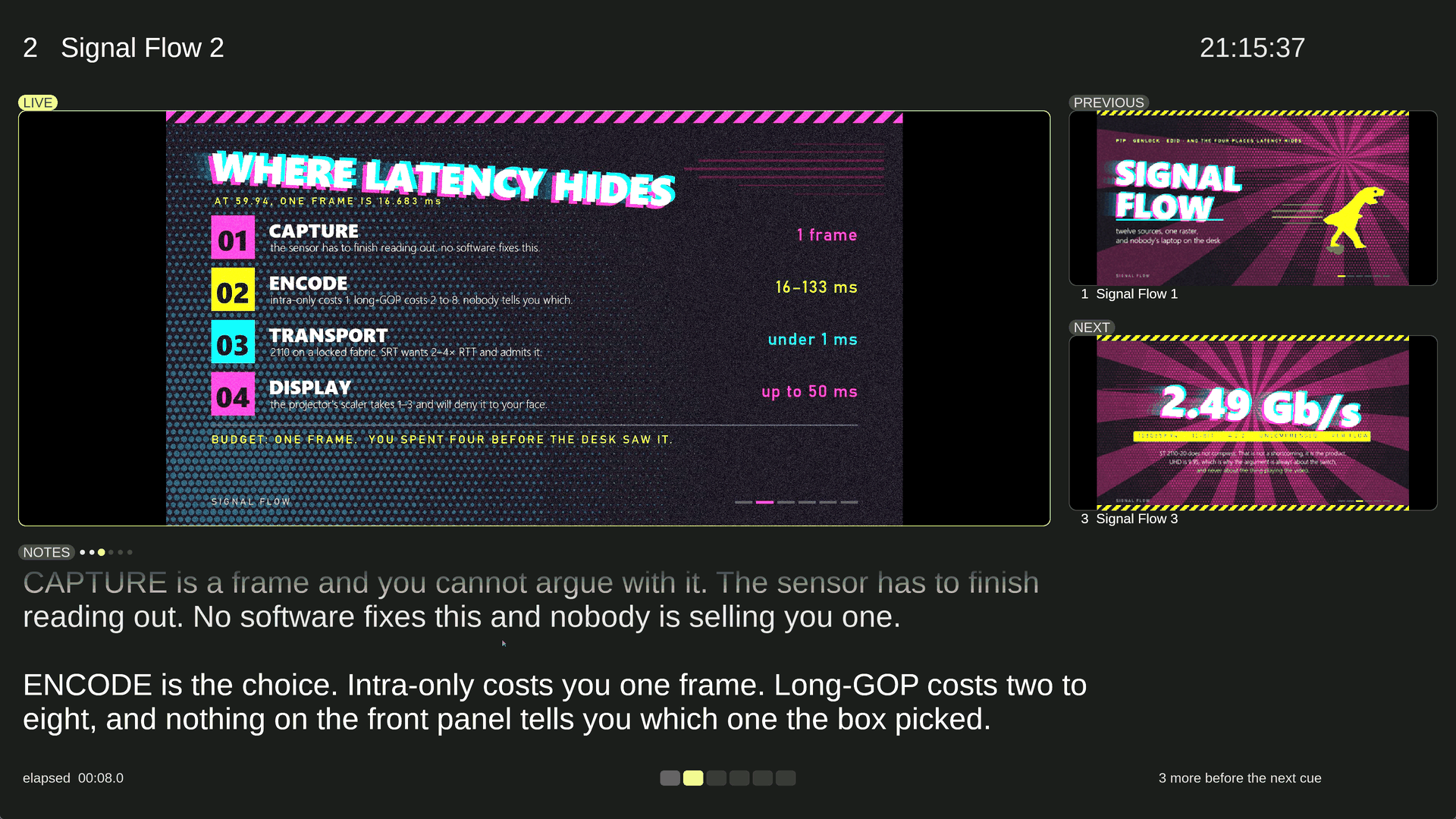
Turn the three pictures off and the notes take the whole screen, which is what somebody reading a long script from a lectern actually wants. Background, ink and accent are set as hex colours, because a presenter screen is often somebody else's laptop in somebody else's room and "make it readable in here" is a real request.
Note builds
A cue's notes split on a line that is exactly ---, and the
presenter advances through those parts without changing the slide, so a long note
is read at the speaker's pace instead of arriving all at once.
A teleprompter as well
The prompter is a separate output type for the person reading out loud. Left empty it follows the live cue's notes; given a script it runs a talk that has no slides at all. It mirrors — horizontally by default, vertically as well, because a beamsplitter can sit above or below the lens — and its pace is set in lines per minute rather than pixels per second, so a pace belongs to the reader and means the same thing when the type size or the screen changes. Text scrolls up through a fixed reading line, so the words being spoken are always in the same place.
What it costs
Nothing. Deckboy is GPL-3.0, for Windows, macOS and Linux, with no account, no licence server and no telemetry. Presenter view and the prompter are not a tier.
How Deckboy compares to ProPresenter, QLab, Mitti and the rest · Questions people ask before a show